ChatGPTTutorial
How to Write Better AI Prompts: A Practical Guide with Templates
A practical prompt guide for ChatGPT, Claude and Gemini: a simple five-part structure, before-and-after examples and copy-ready business templates.

The difference between a useless AI answer and a brilliant one is usually the request, not the model. You do not need technical knowledge to write good prompts. You need to give the AI the same information you would give a capable new colleague on their first day.
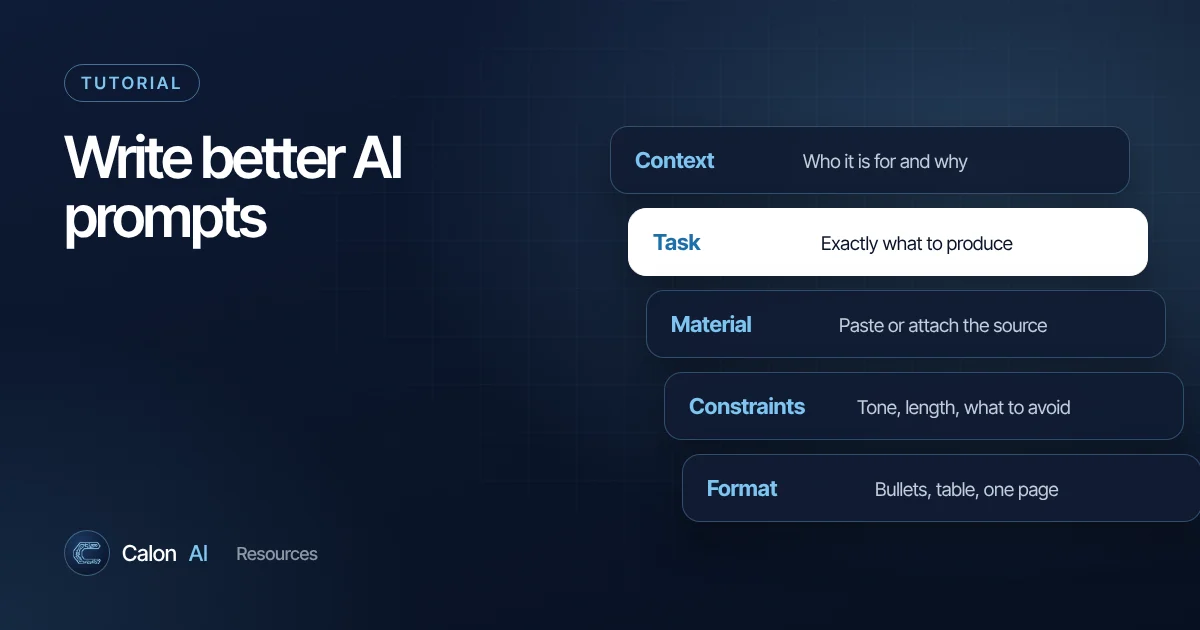
The five-part prompt structure
1. Context: who, what and why
Explain the situation. Who are you, who is the output for and what is it for?
"I run the office for a 14-person solar installation company in South Wales. This email goes to homeowners who requested a quote but have not replied in three weeks."
2. Task: the specific job
Use a clear verb and a defined deliverable. "Help with" is vague; "write", "summarise", "compare", "extract", "rewrite" and "list" are not.
"Write a short follow-up email."
3. Source material: what to work from
Paste the relevant text or upload the file. AI assistants are far more accurate when they work from material you provide than when they rely on general knowledge. Put long material in clearly marked sections:
<quote_details>
...paste here...
</quote_details>
Labels like that help the model keep instructions and material separate. Anthropic's prompting documentation recommends this kind of structure for longer prompts.
4. Constraints: the rules
Length, tone, things to include and things to avoid.
"Under 120 words. Friendly but not pushy. Mention the 0% VAT on residential solar. Do not offer a discount. UK spelling."
5. Format: how the answer should look
"Give me a subject line, then the email body. Then two alternative subject lines."
Before and after
Before:
Write a follow-up email for a solar quote.After:
I manage the office for a 14-person solar installer in South
Wales. Write a follow-up email to a homeowner who requested a
quote three weeks ago and has not replied.

Quote details:
- 4.2 kWp system with 5 kWh battery
- Quoted £8,950, valid until 30 November

Rules: under 120 words, friendly and not pushy, UK spelling,
no discounts, end with a simple yes/no question.

Format: subject line, then email body, then two alternative
subject lines.
The second version takes 60 seconds longer to write and saves several rounds of editing.
Techniques that make a real difference
Show an example of good output
If you have a previous email, report or description you liked, include it and say "match the style and length of this example". Examples communicate tone and structure more precisely than adjectives like "professional" or "punchy".
Ask it to think in steps
For analysis, ask the model to work through the problem before giving a conclusion: "First list the relevant figures, then calculate the margin, then give your recommendation." Modern models reason well, but asking for the steps makes their working visible so you can spot errors.
Give it permission to say "I don't know"
Add: "If the information is not in the material I provided, say so instead of guessing." This one line noticeably reduces made-up answers when you are working from documents.
Ask for options, then choose
"Give me three versions: one formal, one friendly, one very short." Choosing between options is faster than describing what is wrong with a single draft.
Iterate in the same chat
Treat the first answer as a draft. Follow up with specific edits: "Shorter", "Remove the second paragraph", "Make the call to action clearer". The model keeps the context, so small instructions go a long way.
Ask it to critique its own work
"Review your answer against my rules and list anything you missed." This catches ignored constraints, such as word limits, surprisingly often.
Copy-ready templates for business tasks
Summarise a document
Summarise the attached [document type] for [audience].
Focus on: [what matters, e.g. costs, deadlines, risks].
Format: 5 bullet points, then a one-line recommendation.
Quote the exact wording for any figures or deadlines.
If something important is unclear, list it as an open question.
Reply to a customer
Context: [your business, your role].
Customer message: <message>...</message>
Our position: [what you can and cannot offer].
Write a reply that [goal, e.g. keeps the customer, sets a new date].
Tone: [tone]. Length: under [N] words. UK spelling.
Turn notes into actions
From the meeting notes below, list every decision and action.
Table columns: Action | Owner | Deadline | Notes.
If an owner or deadline was not stated, write "Not agreed".
<notes>...</notes>
Compare options
I need to choose between [A], [B] and [C] for [purpose].
Our situation: [team size, budget, tools we already use].
Compare them on: cost, ease of setup, integrations with [tools],
and limits. Use a table, then recommend one and explain why.
Flag anything I should verify on the vendor's website.
Save and reuse what works
When a prompt reliably gives good results, save it. In ChatGPT, put it in a Project or build a custom GPT. In Claude, add it to a Project's instructions. A shared library of team prompts is one of the cheapest productivity improvements a small business can make.
When prompts are not enough
Prompting improves individual tasks. If you find yourself running the same prompt dozens of times a week, copying data in and out of other systems, the next step is automation: a workflow that pulls the data, runs the AI step and pushes the result back into your CRM, inbox or spreadsheet without anyone pasting anything. Read how to automate repetitive business tasks to see how that works.
Frequently asked questions
What is prompt engineering?
It is the practice of writing instructions to an AI model so that it reliably produces the output you want. For most business users that simply means giving clear context, a specific task, the right source material and a defined format.
Do prompts work the same in ChatGPT, Claude and Gemini?
The same principles work across all of them. Each model has its own strengths and quirks, so test an important prompt in the tool you will actually use, but a well-structured prompt transfers well.
How long should a prompt be?
As long as it needs to be. A one-line question is fine for simple tasks. For anything you want done to a standard, a structured prompt of 100 to 300 words plus the source material usually beats a short one.
Sources and further reading
Calon AI Team
Calon AI is a Welsh AI and automation consultancy based in Caerphilly and at the University of South Wales. Our engineers build AI agents, automations and dashboards for founder-led UK businesses, and we write these guides from that hands-on work.
We check facts against official documentation and primary sources at the time of writing and update articles when products change. AI tools change quickly, so confirm prices and plan limits on the provider's own site before you buy.