AI CodingTutorial
Getting Started with Claude Code: Install, First Task and Best Practices
Install Claude Code on Mac, Windows or Linux, run your first task, set up CLAUDE.md and work safely with an AI coding agent. Commands from the official docs.

Claude Code is Anthropic's agentic coding tool. Unlike a chat window that suggests snippets, it reads your codebase, edits files, runs commands and tests, and works with git. It runs in the terminal, as a VS Code or JetBrains extension, in the Claude desktop app and in the browser. This tutorial uses the commands from the official documentation as of November 2026.
Before you start
- An account: a Claude subscription that includes Claude Code, or an Anthropic Console account billed for API usage. See claude.com/pricing.
- A project in git. Claude Code changes files. Version control lets you review and undo everything.
- On native Windows: Git for Windows is recommended so Claude Code can use Bash. Without it, Claude Code uses PowerShell instead. WSL setups do not need it.
Step 1: Install Claude Code
The native installer is recommended and updates itself in the background.
macOS, Linux or WSL:
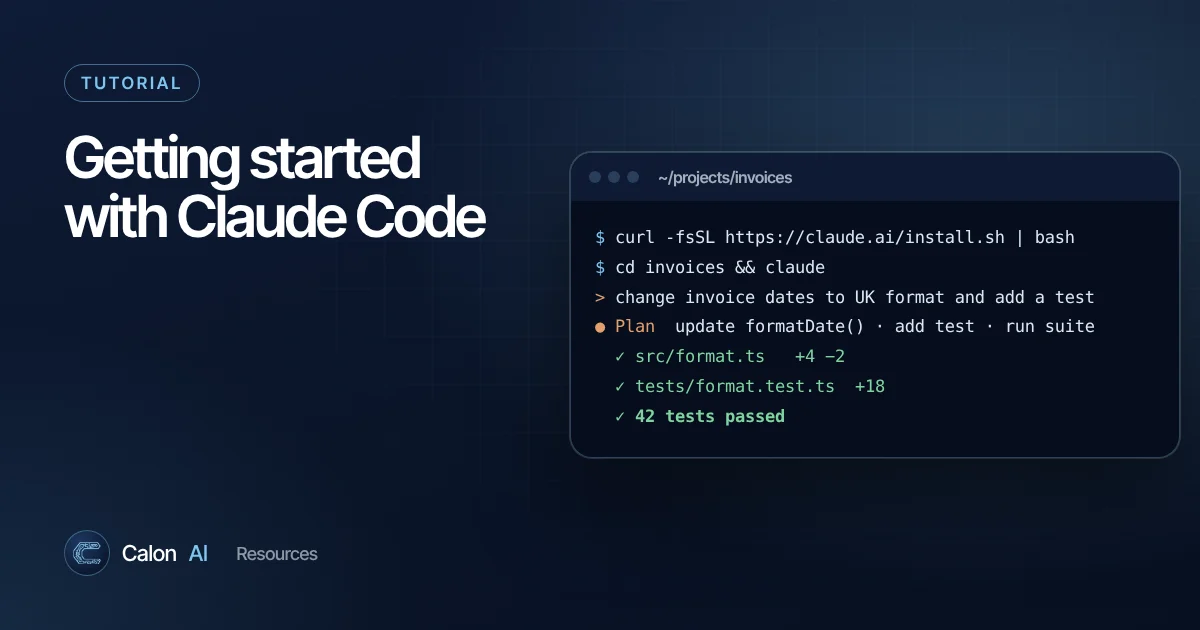
curl -fsSL https://claude.ai/install.sh | bashWindows PowerShell (your prompt starts with PS C:\):
irm https://claude.ai/install.ps1 | iexWindows Command Prompt:
curl -fsSL https://claude.ai/install.cmd -o install.cmd && install.cmd && del install.cmdPackage managers (these do not auto-update, so upgrade them periodically):
brew install --cask claude-code
winget install Anthropic.ClaudeCode
Open a new terminal window and check it worked:
claude --versionIf you see "command not found" or "not recognized", the install folder is not on your PATH yet. Follow the Fix your PATH steps in the installation troubleshooting guide.
Step 2: Start it in your project
cd your-project
claude
The first time, Claude Code asks you to log in. Follow the browser prompt to connect your Claude account. If you have set the ANTHROPIC_API_KEY environment variable and approve it when asked, it uses that instead.
Step 3: Get oriented
Start by asking questions rather than making changes. It is the fastest way to see how Claude Code thinks about your project.
> explain what this project does and how it is structured
> how do I run the tests and start the app locally?
> where is the code that handles user sign-up?
Step 4: Give it a small, real task
Pick something contained with a clear way to check it worked:
> the date on the invoice page shows in US format. change it to
  UK format (13 November 2026), add a test, and run the tests.
Claude Code will typically propose a plan, edit files, run commands and show you diffs. Read the diffs. You stay responsible for what goes into your codebase.
When you are happy:
> commit these changes with a clear messageStep 5: Add a CLAUDE.md file
CLAUDE.md is a Markdown file in your project root that Claude Code reads at the start of every session. It is the single most useful thing you can set up. Run /init to have Claude Code draft one from your codebase, then edit it.
A good CLAUDE.md is short and specific:
# Project notes for Claude

## Commands
- Install: npm install
- Test: npm test
- Lint: npm run lint (must pass before committing)

## Conventions
- TypeScript strict mode. No `any`.
- UK English in all user-facing text.
- Dates are stored in UTC, displayed in Europe/London.

## Rules
- Never edit files in /migrations by hand.
- Ask before adding a new dependency.
If your repository already has an AGENTS.md for other coding agents, Claude Code can read that instead.
Useful commands to know
| Command | What it does |
|---|---|
/init | Drafts a CLAUDE.md for your project |
/help | Lists available commands |
claude -p "..." | Runs a one-off request without the interactive session, useful in scripts and CI |
/schedule | Sets up a scheduled task that runs in the cloud |
claude --version | Shows the installed version |
Best practices from real projects
- Small steps beat big asks. "Build the whole billing system" produces a large change that is hard to review. Break work into tasks you can check in a few minutes.
- Give it a way to verify. Tests, a linter, a type checker or a script that reproduces the bug let Claude Code check its own work.
- Ask for a plan first on anything non-trivial, and correct the plan before any code is written.
- Keep secrets out. Never paste production credentials into a session. Use environment variables and keep
.envfiles out of git. - Review like a pull request from a colleague. Fast, capable and occasionally confidently wrong.
- Put recurring guidance in CLAUDE.md, not in every prompt.
Going further
- IDE extensions: inline diffs and plan review in VS Code, Cursor and JetBrains.
- MCP (Model Context Protocol): connect Claude Code to tools such as issue trackers, design docs and databases.
- Subagents and parallel sessions: split larger work across several agents.
- GitHub Actions and GitLab CI/CD: automate code review and issue triage.
When to bring in help
Claude Code makes experienced developers dramatically faster, and it is a great way to learn. For business-critical systems, such as anything handling customer data, payments or compliance, you still need sound architecture, security review and someone accountable when it breaks. Calon AI builds operational software and AI systems for UK businesses using these tools every day. See the 7-screen MVP we delivered in three weeks, or talk to our engineers.
Frequently asked questions
Is Claude Code free?
Claude Code needs a Claude subscription that includes it (Pro and above) or an Anthropic Console account billed for API usage. Most surfaces, including the desktop app, require a paid plan. Check claude.com/pricing for current plans.
Do I need to be a developer to use Claude Code?
It helps a great deal. Claude Code edits files and runs commands in your project, so you need to understand enough to review what it changes. Non-developers can learn with it, but should work on copies of projects, in git, and never on live systems.
What does "claude command not found" mean after installing?
The install directory is not on your PATH yet. Open a new terminal window first. If it still fails, follow the "Fix your PATH" steps in Anthropic's installation troubleshooting guide.
Does Claude Code work in VS Code?
Yes. There is an official extension for VS Code (and Cursor) with inline diffs and plan review, and a plugin for JetBrains IDEs. Claude Code is also available in a desktop app and on the web at claude.ai/code.
Sources and further reading
Calon AI Team
Calon AI is a Welsh AI and automation consultancy based in Caerphilly and at the University of South Wales. Our engineers build AI agents, automations and dashboards for founder-led UK businesses, and we write these guides from that hands-on work.
We check facts against official documentation and primary sources at the time of writing and update articles when products change. AI tools change quickly, so confirm prices and plan limits on the provider's own site before you buy.