AutomationHow-to guide
How to Connect Two Business Apps: Native Integrations, No-Code Tools and APIs
Four ways to make your business apps talk to each other: native integrations, Zapier or Make, webhooks and APIs. How to pick the right one, step by step.

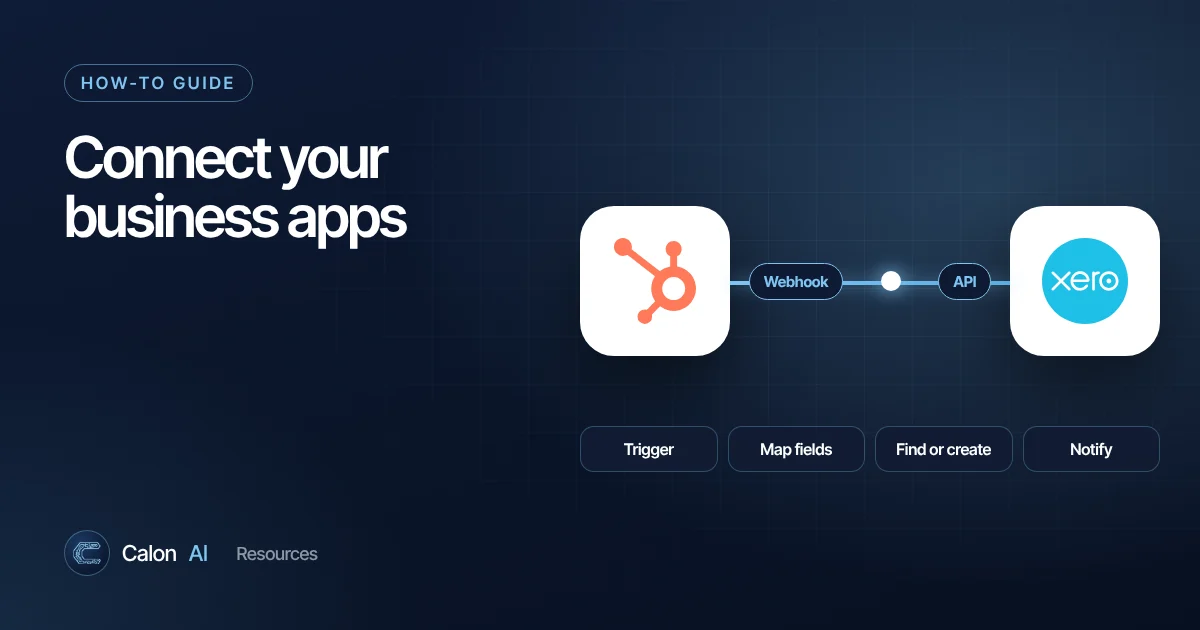
Most small businesses run on five to fifteen apps: a CRM, accounts, job management, email, calendars, forms, spreadsheets. When they do not talk to each other, people copy data between them by hand, which is slow, error-prone and the main reason "the CRM is never up to date". Here is how to connect them, from the simplest option to the most powerful.
Before you start: map the data flow
Spend ten minutes on paper before touching any settings.
- What event starts it? For example, "a quote is accepted in our quoting tool".
- What should happen, and where? "Create a job in the job management system and an invoice draft in Xero."
- Which app owns which data? Customer details might live in the CRM, invoices in Xero, job status in the job system. Each piece of data should have one home.
- How will you match records? Email address, phone number or a customer ID. Matching on name alone causes duplicates.
- What happens when it fails? Someone needs to be told.
Option 1: Native integrations
Many apps connect directly to popular tools. Look in Settings, Integrations, Apps or Marketplace in either product, and search the other app's name. Common examples include accounting software syncing with CRMs and job management tools, or form tools sending entries straight to a CRM.
Pros: free or included, supported by the vendor, usually reliable.
Cons: limited to what the vendor built. You often cannot change which fields sync or add logic.
Option 2: No-code automation tools
When there is no native integration, or it does not do enough, tools such as Zapier, Make and n8n sit between your apps.
Every automation follows the same pattern:
- Trigger: the event that starts it, such as "new row in Google Sheets" or "new deal won in HubSpot".
- Actions: what happens next, such as "create contact", "send email", "post Slack message".
- Logic (optional): filters, branches, delays and data formatting in between.
Step by step: connect a form to your CRM and team chat
- Pick the trigger app and event: your form tool, "new submission".
- Connect your account when prompted, and submit a test entry so the tool has sample data.
- Add a "find or create contact" action in your CRM, matching on email address. This prevents duplicates.
- Map the fields: form "Phone" to CRM "Phone", and so on. Format dates and phone numbers if needed.
- Add a notification action: a Slack or Teams message to the right channel with the key details and a link to the CRM record.
- Test with realistic data, including a duplicate email and a missing field.
- Turn it on and set up error alerts, so someone hears about it when a run fails.
Not sure which tool to use? Read our Zapier vs Make vs n8n comparison.
Option 3: Webhooks
A webhook is a message an app sends automatically to a web address the moment something happens, such as "order paid" or "form submitted". It is how integrations react instantly instead of checking every few minutes.
- In the sending app, look for Webhooks in settings and paste in the address your automation tool or server gives you.
- Choose which events to send.
- Most no-code tools offer a "catch webhook" trigger, so you can use webhooks without code.
Webhooks are ideal when an app is not in a tool's library but can send webhooks, which many can.
Option 4: APIs
An API (application programming interface) is a documented way for software to read and write data in another system on demand. Almost every modern business app has one. Search "[product name] API documentation" to find it.
Use an API when you need to:
- Connect software with no ready-made integration, such as many specialist UK trade and job management tools.
- Move large volumes of data or run complex logic.
- Build something reliable enough to run critical operations.
You can call APIs without writing a full application. n8n's HTTP Request node and similar steps in Zapier and Make make API calls from a visual workflow. You will need an API key or to authorise access, and to read the documentation for the right endpoints. Store keys securely and give them the minimum permissions needed.
Which option should you use?
| Situation | Best option |
|---|---|
| Both apps list each other as an integration | Native integration |
| Mainstream apps, simple flow, non-technical team | Zapier |
| Several steps, branching, data reshaping | Make or n8n |
| One app can send webhooks but is not in the tool library | Webhook trigger in Zapier, Make or n8n |
| Specialist software with an API, high volume or critical process | API integration, often via n8n or custom code |
| No integrations and no API | Scheduled export and import, email parsing, then consider replacing the tool |
Common mistakes
- Two-way syncing everything. It creates loops and conflicts. Sync one way per data type wherever possible.
- No error handling. Integrations fail silently when a password changes or an API is down. Add failure alerts.
- Matching on names. "J Smith" and "John Smith" become two customers. Match on email or ID.
- Building on a personal account. If the person who set it up leaves, everything breaks. Use a shared business account.
- No documentation. Keep a simple list of every automation, what it does and who owns it.
Where AI fits in
Once your apps are connected, AI can sit in the middle of the flow: reading an enquiry and deciding where it goes, extracting details from an attached PDF, drafting a reply for approval, or summarising a job before it hits the CRM. See how to automate repetitive business tasks for examples.
If you have a tangle of tools that do not talk to each other, that is exactly what Calon AI fixes. We replaced five disconnected tools with one platform for a Welsh fire and security installer, saving the director six to eight hours a week. Talk to us about yours.
Frequently asked questions
What is the easiest way to connect two apps?
Check whether one app has a built-in (native) integration with the other, usually under Settings, Integrations or Apps. If not, a no-code tool such as Zapier or Make can connect most mainstream business apps without any code.
What is the difference between an API and a webhook?
An API lets one system ask another for data or tell it to do something, whenever it chooses. A webhook is a message one system sends automatically to a web address the moment an event happens, such as a new order. Most integrations use both.
What if my software has no integrations at all?
Check whether it has an API (search "[product name] API documentation"). If it does, a developer or a tool like n8n can connect it. If it has no API, options include scheduled exports and imports, email parsing or, as a last resort, browser automation.
How do I stop duplicate records when syncing apps?
Decide which app owns each type of data, match records on a stable unique field such as email address or customer ID, and use "find or create" steps rather than always creating new records.
Sources and further reading
Calon AI Team
Calon AI is a Welsh AI and automation consultancy based in Caerphilly and at the University of South Wales. Our engineers build AI agents, automations and dashboards for founder-led UK businesses, and we write these guides from that hands-on work.
We check facts against official documentation and primary sources at the time of writing and update articles when products change. AI tools change quickly, so confirm prices and plan limits on the provider's own site before you buy.