AI for BusinessGuide
How to Automate Customer Support with AI (Without Annoying Your Customers)
A practical guide to AI customer support for small businesses: instant replies, triage, draft responses and chatbots, with what to automate and what to keep human.

For a small business, slow replies cost real money. A customer who waits two days for an answer has usually booked someone else. AI can close that gap, but done badly it frustrates customers and damages your reputation. Here is how to do it well.
What good AI customer support looks like
The goal is not to remove people. It is to make sure:
- Every customer gets a fast, relevant first response, day or night.
- Urgent and valuable enquiries reach the right person immediately.
- Your team spends its time on conversations that need a human, not on retyping and routing.
The four levels of support automation
Work up these levels in order. Each one builds on the last.
Level 1: Instant acknowledgement and routing
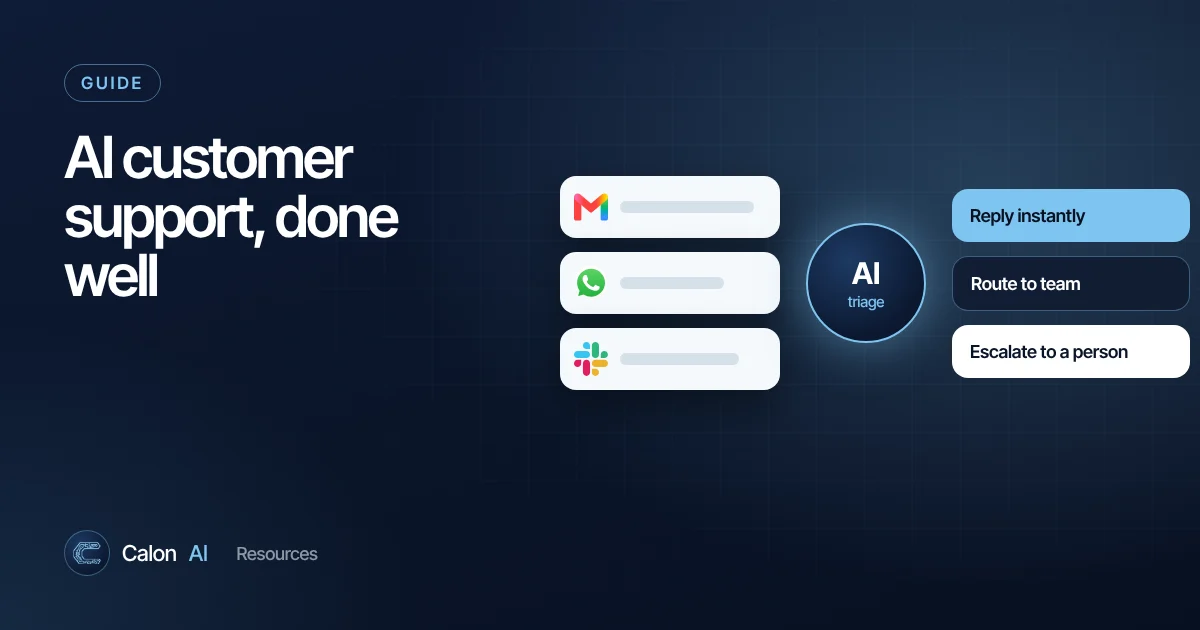
AI reads each incoming message, from email, web forms, WhatsApp or chat, and:
- Identifies what it is about (new enquiry, existing job, complaint, invoice question).
- Picks out key details: name, postcode, service, urgency.
- Creates or updates the record in your CRM or helpdesk.
- Alerts the right person with a short summary.
- Sends the customer a helpful acknowledgement with realistic next steps.
Risk: low. Impact: high. This is where we recommend almost every business starts.
Level 2: AI-drafted replies for approval
AI drafts a reply using your approved information, such as prices, service areas, policies and FAQs, and a person reviews, edits and sends it. Your team gets faster, replies get more consistent and you learn where the AI is reliable before letting it answer alone.
Level 3: Automated answers for simple questions
For frequent, low-risk questions, such as opening hours, service areas, how to book, or what to do before a survey, AI can answer directly. Requirements:
- A maintained knowledge base the AI answers from.
- An instruction to hand over to a person when unsure, rather than guess.
- Monitoring: review a sample of conversations every week.
Level 4: AI agents that take actions
AI that can check availability, book appointments, update orders or issue standard documents. Powerful, but it needs careful permissions, testing and logging. Only build this on top of the first three levels working well.
What to keep human
- Complaints and anything emotionally charged.
- Refunds, disputes and anything with legal or financial consequences.
- High-value sales conversations.
- Vulnerable customers, and anyone who asks for a person.
Make the route to a human obvious: a "talk to a person" option, a phone number, or an automatic hand-off when the customer is unhappy.
How to make AI answers accurate
AI models are fluent but do not know your business. Accuracy comes from grounding: making the model answer from your own information.
- Write a knowledge base: services, prices or price ranges, service areas, policies, lead times, common questions. Plain documents are fine.
- Instruct the AI to use only that information and to say it will pass the question on if the answer is not there.
- Keep it up to date. Wrong prices in the knowledge base become wrong answers to customers.
- Review real conversations weekly and fix the gaps you find.
Choosing your approach
| Your situation | Sensible approach |
|---|---|
| Enquiries mainly by email and web form, CRM in place | Workflow automation with an AI triage and drafting step |
| Already using a helpdesk such as Zendesk, Intercom or Freshdesk | Start with the helpdesk's built-in AI features, connected to your knowledge base |
| Messages spread across email, WhatsApp, phone and social | A central inbox or CRM first, then AI triage across every channel |
| Industry-specific job management software | Custom integration so AI can read and update job records |
Measure the right things
- First response time: how quickly customers hear back.
- Coverage: the percentage of enquiries that get a response within your target time.
- Conversion: enquiries that become calls, surveys or bookings.
- Escalation rate and customer satisfaction: are customers being helped, or deflected?
Data protection
Customer messages contain personal data, so UK GDPR applies. Use business-grade tools with appropriate data terms, keep only the data you need, explain your use of AI in your privacy notice and keep people in control of significant decisions. See our guide to AI data privacy for UK businesses.
A real result
A UK fire and security business was leaving one in five enquiries without a response for 48 hours. We built an AI enquiry-handling workflow across every channel. First response time fell from 24 to 48 hours to under 30 minutes, every enquiry is now covered, and enquiry-to-call conversion rose 30 to 45%. Read the case study.
Want to know what this would look like for your business? Book a 15-minute call. If it is not worth automating, we will tell you.
Frequently asked questions
Can AI handle customer service for a small business?
AI can handle a large share of routine work: acknowledging messages instantly, answering common questions from your own information, routing enquiries and drafting replies. Complex, emotional or high-value conversations should still reach a person quickly.
Should I use an AI chatbot on my website?
Only once you have a reliable knowledge base and a clear hand-off to a human. Many businesses get more value first from faster email and form responses, smart routing and AI-drafted replies that staff approve.
Do I have to tell customers they are talking to AI?
It is good practice and builds trust. Transparency is also a core principle of UK data protection law, so your privacy notice should cover how you use AI in customer communications.
What tools are used for AI customer support?
Helpdesk platforms such as Zendesk, Intercom and Freshdesk have built-in AI features. Businesses that use other systems often connect their inbox, website forms and CRM to an AI model through a workflow tool or a custom integration.
Sources and further reading
Calon AI Team
Calon AI is a Welsh AI and automation consultancy based in Caerphilly and at the University of South Wales. Our engineers build AI agents, automations and dashboards for founder-led UK businesses, and we write these guides from that hands-on work.
We check facts against official documentation and primary sources at the time of writing and update articles when products change. AI tools change quickly, so confirm prices and plan limits on the provider's own site before you buy.